I’ve tested dozens of AI tools promising to revolutionize my workflow. Here’s what PopAi actually delivers.
Let me be honest with you: I’m tired of AI tools that overpromise and underdeliver. You know the type—slick landing pages, bold claims, and then… disappointment. So when I first heard about PopAi, I rolled my eyes. Another “AI-powered workspace”? Sure.
But here’s the thing. After spending weeks with PopAi AI, creating presentations at 2 AM, wrestling with PDF documents, and pushing its limits, I’ve got thoughts. Real ones. Not the sanitized marketing speak you’ll find elsewhere.
Whether you’re a content creator drowning in deadlines, a digital marketer juggling twelve projects, or a freelancer trying to scale without losing your mind, this PopAi review will tell you exactly what you need to know. No fluff. Just the stuff that actually matters.
Contents
- 1 What Is PopAi? (And Why Should You Care)
- 2 PopAi Features: The Good, The Great, and The “Wait, What?”
- 3 PopAi Pricing: Is It Actually Worth It?
- 4 How to Actually Use PopAi (Real Tutorial, Not Marketing Fluff)
- 5 PopAi vs The Competition: The Honest Breakdown
- 6 Top PopAi Alternatives 2025: When to Look Elsewhere
- 7 PopAi Mobile App: Work on the Go (Sort Of)
- 8 The Real Verdict: Should You Use PopAi?
- 9 Your PopAi Questions, Actually Answered
- 10 Tools That Work Great With PopAi
- 11 Final Thoughts: Is PopAi Worth It in 2025?
- 12 Ready to Test Drive PopAi?
What Is PopAi? (And Why Should You Care)
PopAi is an AI-powered workspace using GPT-4 and LLMs for instant answers, PDF reading, presentations, and content creation. Think of it as your Swiss Army knife for digital work—if that knife was powered by artificial intelligence and had a surprisingly decent user interface.
But here’s what makes PopAi different from the hundred other AI tools clogging your bookmarks bar: it’s built around actual workflows. Instead of forcing you to jump between ChatGPT for writing, Canva for visuals, and some clunky PDF reader, PopAi workspace brings everything under one roof.
I’ve watched it transform a messy 50-page research PDF into digestible insights in minutes. I’ve seen it generate presentation slides that didn’t make me want to cry. And yes, I’ve also seen where it falls short—but we’ll get to that.
PopAi Features: The Good, The Great, and The “Wait, What?”
Let’s break down the PopAi features that actually matter. Not the marketing bullet points—the real deal.
AI ChatPDF: Your Document Whisperer
The AI ChatPDF feature is legitimately impressive. Upload a PDF, ask questions, get answers. Sounds simple, right? But the execution is where PopAi shines.
I threw a dense legal contract at it last week. Instead of spending hours decoding legalese, I asked, “What are the termination clauses?” and got a clear breakdown with page references. It’s like having a research assistant who never gets tired or snarky.
Does PopAi support document analysis? Yes, via AI ChatPDF for Q&A, summaries, and insights from PDFs and other formats. It handles research papers, reports, contracts, and even poorly scanned documents with surprising accuracy.
PopAi Presentation: From Panic to Polished
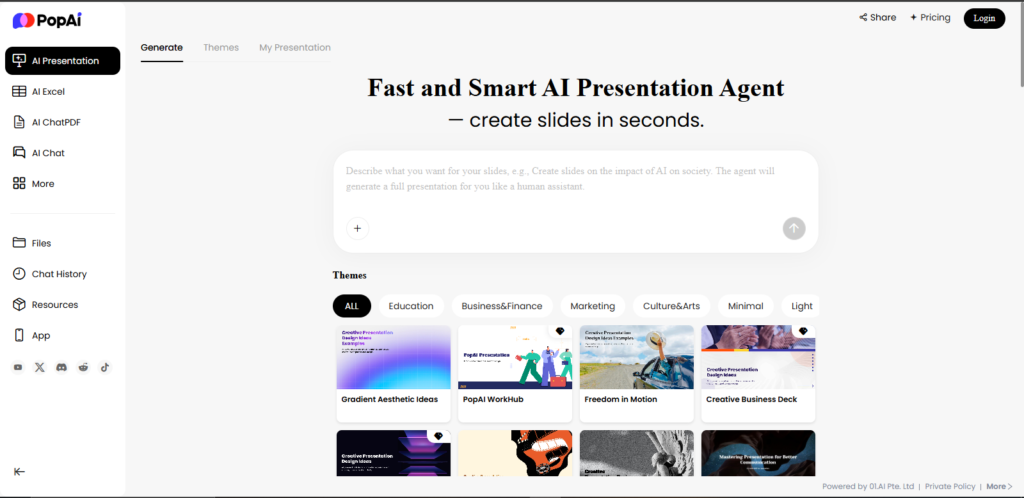
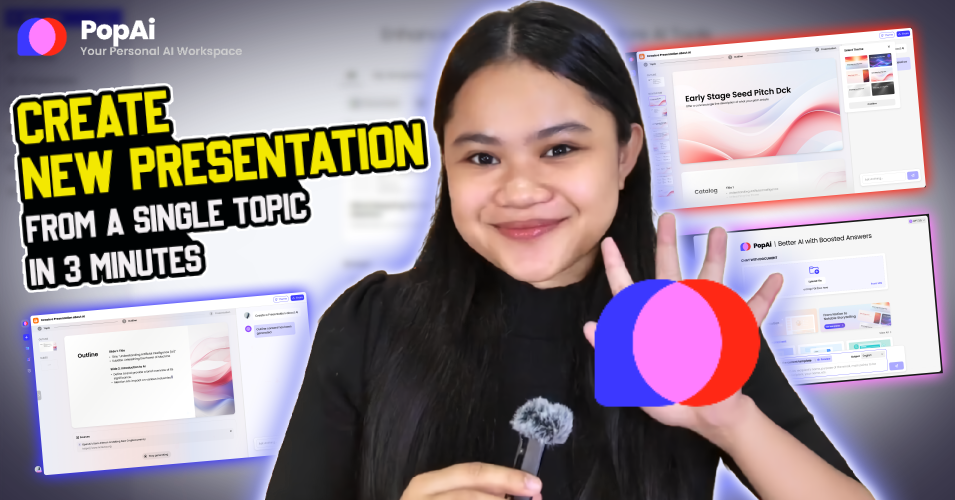
Creating presentations with PopAi? Enter a topic, select a template, and PopAi generates outlines, layouts, and exports to PPTX. I’ve used it for client pitches, webinar decks, and yes, that last-minute team meeting where I forgot to prepare anything.
The PopAi presentation tool isn’t going to win design awards, but it’s fast and functional. Think “professional enough” rather than “jaw-dropping.” For most use cases? That’s exactly what you need.
How do I create presentations with PopAi? The process takes under 10 minutes:
- Hit the presentation tool
- Enter your topic (be specific—”Q4 Marketing Strategy” works better than “Business Stuff”)
- Pick a template based on color scheme
- Let it generate (30-60 seconds)
- Edit and add your voice
- Export to PPTX
PopAi Image Generator: Hit or Miss
The PopAi image generator creates custom images from text prompts with editing and commercial rights. It’s… fine. Not revolutionary, but serviceable for social media graphics or blog headers when you’re in a pinch.
Can PopAi generate images? Yes, and you get commercial rights, which is nice. But I wouldn’t rely on it for anything high-stakes. For quick content creation? It gets the job done.
Writing Assistant & Paraphraser: Your Content Sidekick
The writing tools are solid—better than I expected, honestly. The paraphraser actually understands context (shocking, I know), and the writing assistant doesn’t sound like a robot wrote it. Which, given that a robot did write it, is pretty meta.
PopAi Pricing: Is It Actually Worth It?
Let’s talk money. Because PopAi pricing is where things get interesting—and where you need to make some real decisions.
| Plan | Price | Best For |
|---|---|---|
| Free | $0 | Testing the waters, occasional use |
| Weekly Pro | $5.99/week | Short-term projects, one-off needs |
| Monthly Pro | $14/month | Regular users (most popular) |
| Quarterly Pro | $35/quarter | Committed users saving ~17% |
| Yearly Pro | $99/year | Power users saving ~40% |
How much does PopAi cost? Pricing includes free tier, Monthly Pro at $14, Weekly Pro at $5.99, Quarterly Pro at $35, and Yearly Pro at $99.
Is PopAi free to use? Yes, PopAi offers a free version with core features, though Pro unlocks advanced capabilities like unlimited generations. The free tier is generous enough to get real work done, which I appreciate.
Here’s my take: if you’re using it regularly (think multiple times a week), the yearly PopAi pro plan at $99 is the move. That’s about $8.25 per month. Compare that to ChatGPT Plus at $20/month, and you’re getting more tools for less money.
But—and this is important—only upgrade if you actually need the advanced features. Don’t fall for the “unlimited generations” hype if you’re only making one presentation a month. Be smart about your budget.
How to Actually Use PopAi (Real Tutorial, Not Marketing Fluff)
Looking for a PopAi tutorial? Here’s what actually works, based on my real-world testing.
Creating Killer Presentations in Under 10 Minutes
- Hit the presentation tool. Don’t overthink the topic input—PopAi works better with clear, specific topics like “Q4 Marketing Strategy” rather than vague ones like “Business Stuff.”
- Pick a template. They’re all pretty similar, honestly. Choose based on color scheme and move on.
- Let it generate. This takes 30-60 seconds. Go grab coffee.
- Edit like crazy. The AI gives you a solid foundation, but you’ll need to add your voice, swap out generic examples, and fix any weird phrasing.
- Export to PPTX. Then polish in PowerPoint or Google Slides if needed.
Mastering Document AI for Research
The PopAi document AI is where I spend most of my time. Here’s the workflow that saves me hours each week:
- Upload your PDF (works with docs, research papers, reports)
- Start broad: “Summarize the main arguments”
- Get specific: “What data supports claim X?” or “Explain section 3 in simple terms”
- Cross-reference: “How does this compare to [concept]?”
Pro tip: The more specific your questions, the better the answers. “Tell me about this document” gets mediocre results. “What are the three main risks identified on pages 12-15?” gets gold.
PopAi vs The Competition: The Honest Breakdown
PopAi vs ChatGPT: Different Animals
Everyone asks: How does PopAi compare to ChatGPT? Here’s the truth—PopAi excels in workspace tools like presentations and PDFs, while ChatGPT focuses on general chat.
ChatGPT is your generalist friend who knows a little about everything. PopAi is your specialist colleague who’s laser-focused on productivity tasks. I use both. They serve different purposes. Stop trying to make them compete.
PopAi vs Copy AI: Content Creation Showdown
PopAi vs Copy AI? Copy AI is faster for short-form marketing copy—social posts, ad headlines, email subject lines. But PopAi handles longer documents and presentations better. If you’re in marketing, you might need both. If you’re doing research and presentations, PopAi wins.
PopAi vs Jasper: The Writer’s Dilemma
Jasper is the heavyweight for blog content and SEO-optimized copy. PopAi vs Jasper isn’t even a fair fight for pure writing—Jasper wins. But if you need presentations, PDF analysis, and writing in one tool? PopAi’s versatility is the advantage.
Top PopAi Alternatives 2025: When to Look Elsewhere
Look, PopAi isn’t perfect. Sometimes you need something else. Here are the best PopAi alternatives 2025 worth considering:
Design-Focused Alternatives
Grammarly – Best for grammar perfectionists who need real-time writing help across every platform. AI writing assistant for grammar, style, and plagiarism checks.
Presentations.ai – Best for design-focused users wanting prettier slides than PopAi generates. AI slide generator turning text into professional PPTs.
ClickUp – Best for teams needing project management plus AI tools. All-in-one workspace with AI for tasks, docs, and presentations like PopAi.
Content Creation Powerhouses
Jasper AI – Content creation tool for blogs, ads, and SEO-optimized copy. Superior for long-form content.
Copy AI – Fast AI writer for marketing copy, outperforming in short-form content.
Writesonic – AI for long-form content, SEO, and chat-based generation.
Document & Productivity Tools
Notion AI – Best for Notion devotees. Integrated AI in Notion for summaries, brainstorming, and database automation.
Quillbot – Paraphrasing and summarizing tool with grammar enhancements.
UPDF AI – Affordable AI for PDF summaries, translation, and editing vs PopAi.
Presentation Specialists
Plus AI – Google Slides add-on for AI-powered presentation building.
Slideoo AI – Quick AI slides from topics, similar to PopAi’s presentation feature.
Smallppt – AI slide maker competing directly with PopAi presentations.
Additional Tools Worth Exploring
Want more AI productivity tools like PopAi? Consider:
- Rytr – Budget AI writer for social posts and blogs
- Zoom Workplace – AI-enhanced collaboration with note-taking
- Mailchimp – Email marketing AI for campaigns
- Semrush – SEO suite with AI keyword tools complementing PopAi
- ChatGPT Plus – Advanced GPT access for custom AI workflows
PopAi Mobile App: Work on the Go (Sort Of)
Is there a PopAi mobile app? Yes, available on App Store for AI chat and homework help, used by over 100,000 users.
I’ll be straight with you: the mobile experience is fine for quick queries and document chats, but don’t try creating full presentations on your phone. You’ll want a proper screen for that. Use the app for on-the-go questions and research, then switch to desktop for serious work.
The Real Verdict: Should You Use PopAi?
✅ You’ll Love PopAi If…
- You regularly create presentations and need speed over perfection
- You work with lots of PDF documents and research papers
- You want multiple AI tools without juggling subscriptions
- You value efficiency and don’t need bleeding-edge features
- You’re a freelancer or small business owner watching your budget
❌ Skip PopAi If…
- You need top-tier design and visual polish in every presentation
- You’re primarily focused on SEO content writing (Jasper or Writesonic are better)
- You want cutting-edge image generation (try Midjourney instead)
- You rarely work with documents or presentations
- You need advanced team collaboration features
Here’s my bottom line after extensive testing: PopAi is a solid B+ tool. Not perfect. Not revolutionary. But genuinely useful for the right person.
I use it 3-4 times a week. Mostly for PDF research and quick presentations. It’s saved me probably 20+ hours over the past two months. That math works out for me. Will it work out for you? Depends on your workflow.
Your PopAi Questions, Actually Answered
What is PopAi?
PopAi is an AI-powered workspace using GPT-4 and LLMs for instant answers, PDF reading, presentations, and content creation. It combines multiple AI tools into one platform for productivity.
Can I try PopAi before paying?
Absolutely. The PopAi free trial (technically the free tier) gives you enough to test drive the core features. Start there, use it for a week, then decide if you need Pro.
What are PopAi’s main features?
Key tools include AI ChatPDF, presentation maker, writing assistant, paraphraser, and image generator. These cover most productivity needs for content creators and digital marketers.
Does PopAi have SEO tools built in?
Not really. PopAi SEO tools are minimal—basic keyword awareness in the writing assistant. For serious SEO work, pair it with Semrush or use Writesonic instead.
Is there a PopAi affiliate program?
Yes. If you’re interested in the PopAi affiliate program, check their website for current commission structures. Though honestly, there are better affiliate programs out there if that’s your primary goal.
What’s the best AI presentation maker overall?
For speed: PopAi. For design: Presentations.ai. For Google Slides integration: Plus AI. The best AI presentation maker depends on your priority—fast versus beautiful.
Tools That Work Great With PopAi
PopAi doesn’t do everything. Here’s my actual tech stack that complements it:
Semrush – For SEO research and keyword tracking that PopAi lacks
Grammarly – Because AI still makes grammar mistakes, and you want a safety net
Notion AI – For organizing everything PopAi helps you create
Mailchimp – To distribute the content you’ve created with PopAi’s help
ClickUp – For managing projects that involve PopAi deliverables
Apollo.io – Sales AI for outreach, paired with content tools like PopAi
Chronicle – AI note-taking and writing companion
Final Thoughts: Is PopAi Worth It in 2025?
After weeks of testing, here’s what I know: PopAi won’t change your life. But it might save you a few hours each week. And in our world, time is the only currency that actually matters.
It’s not the flashiest tool. It’s not the most innovative. But it’s reliable, affordable, and solves real problems for people who work with documents and presentations regularly.
My recommendation? Try the free version for two weeks. Actually use it—don’t just log in once and forget about it. Create presentations, analyze documents, test the writing assistant. See if it fits your workflow.
If you find yourself reaching for it multiple times a week, grab the yearly plan at $99. If not, move on without guilt. There are plenty of other tools out there.
Ready to Test Drive PopAi?
Start with the free version today. No credit card required. See if PopAi actually saves you time—or if it’s just another bookmark you’ll never use again.
Found this review helpful? Share it with someone who’s drowning in documents and presentations.
Have questions about PopAi or want to share your own experience? Drop a comment below—I actually read them.
Author’s Note: This review is based on extensive hands-on testing of PopAi over several weeks. All opinions are my own, and I’ve tried to give you the most honest assessment possible. Your mileage may vary depending on your specific needs and workflow. Always test tools yourself before committing to paid plans.
Related Articles:
- Best AI Tools for Content Creators in 2025
- ChatGPT vs Other AI Tools: Complete Comparison
- How to Choose the Right AI Productivity Tool
Tags: PopAi, PopAi review, AI productivity tools, AI presentation maker, AI ChatPDF, PopAi pricing, PopAi alternatives, content creation tools, digital marketing tools, AI workspace